
One Product Model, Every Coding Agent
The limiting factor for AI coding agents is no longer generation speed — it's context quality. AppGenie exposes your product model over MCP, the open standard, so any compatible agent reads the same structured features, scenarios, and acceptance criteria. You choose the agent; AppGenie provides the context.
Join the Waitlist →

Agent-Agnostic by Design
Agents from one-line prompts produce generic code. Agents from structured specs produce code that satisfies your scenarios — whichever agent you use.

One Open Standard
AppGenie speaks MCP — the open Model Context Protocol. Any agent that supports it reads your product model the same way. No per-vendor connector, no lock-in to a single coding agent.

One Model, Every Agent
The product model is the integration point, not the agent. Mix Claude Code, Cursor, and whatever MCP-compatible agent you adopt next — Windsurf included — every agent reads the same features, scenarios, and criteria, and writes back to the same source of truth.

Tests That Verify Intent
AppGenie generates E2E tests from the same scenarios your agents build against. Whichever agent wrote the code, the tests confirm it satisfies the spec — not just that it compiles.

The product model is the integration point — not the agent. Mix and match coding agents all you like; they all read from, and write back to, one source of product intent.
The Same Structured
Spec for All of Them
Whether your team runs Claude Code in the terminal or Cursor in the editor, each agent reads the same product model through MCP — features, scenarios, acceptance criteria, and how they relate. And each can write back to it. Any MCP-compatible agent connects the same way — Windsurf included — and a new agent you adopt next quarter inherits the same structured context on day one, no migration required.
See the Claude Code integration →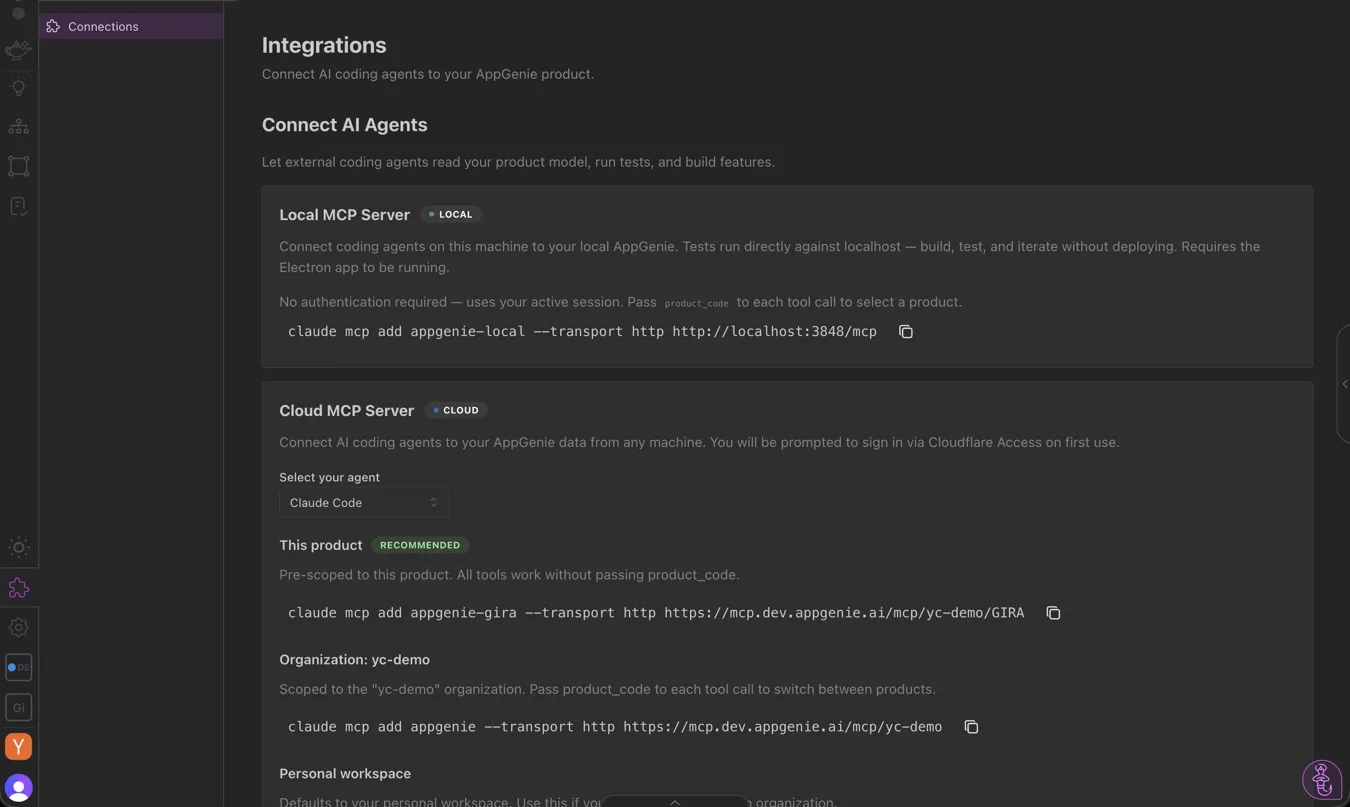

How to Connect
One configuration, copied from the app into whichever agents your team uses.
Build Your Product Model
Define features and scenarios with acceptance criteria — the structured spec every agent will read.
Get Your Config In-App
Open the Integrations page in the AppGenie app for your MCP server configuration and API key, with per-agent setup instructions.
Connect Any MCP Agent
Point Claude Code, Cursor, or any MCP-compatible agent — Windsurf included — at the same model. They all read the same spec.
Verify With Generated Tests
Run the E2E tests AppGenie generated from those scenarios against the output — regardless of which agent produced it.

What's Live Today
MCP read + write is shipped for any compatible agent. Setup runs through the in-app Integrations page today; a published one-line install package is on the way.
- ✓ MCP read access to features, scenarios, and acceptance criteria
- ✓ Bidirectional write-back to the product model
- ✓ Works with Claude Code and Cursor today
- ✓ Agent-agnostic: compatible with any MCP agent, including Windsurf — one product model
- ✓ E2E tests generated from the same scenarios for verification
- ◇ Published npm/npx package for one-line install Coming Soon

Frequently Asked Questions
Which AI coding agents work with AppGenie?
Any agent that supports the Model Context Protocol (MCP) can read from AppGenie's product model. That includes Claude Code and Cursor today, plus any MCP-compatible agent your team adopts — Windsurf included. You choose the agent; AppGenie provides the structured context.
What is MCP and why does it matter?
MCP — the Model Context Protocol — is an open standard for providing structured context to AI tools. Because AppGenie exposes the product model over MCP, you're not locked into a single agent or vendor. One product model serves every MCP-compatible agent uniformly.
Is the integration the same across agents?
Yes. The product model is the integration point, not a per-agent connector. Every MCP agent reads the same features, scenarios, and acceptance criteria, and can write back to the same model. Teams can mix agents without fragmenting their source of product intent.
How do I connect an MCP agent to AppGenie?
Build your product model, then open the Integrations page in the AppGenie app for your MCP server configuration and API key, with copy-ready per-agent setup instructions. Once connected, the agent reads your spec on demand before generating code.
Give every agent the same spec.
Join the waitlist to connect any MCP-compatible agent at launch.
Join the Waitlist →